
Rocket Blog
Top Highlights


Category
- - tvOS 27 1
- 1Password 1
- AI 4
- Advanced 2
- AirPods 1
- App Store 1
- Apple Intelligence 1
- Apple News 5
- Apple Pros 25
- Apple TV 1
- Apple TV 4K 1
- Apple Watch 1
- Apple Watch Series 12 2
- Apple Watch Ultra 4 2
- AppleScript 1
- Article 18
- Artificial Intelligence 4
- Business 2
- Calendar 1
- Camera Control 2
- Camera app 1
- ChatGPT 1
- Claude 1
- Control Center 1
- Explainer 4
- Finder 1
- Hardware 1
- Home 1
- HomeKit 1
- HomePod 1
- HomePod mini 1
- HomeView 1
- How-To 6
- Image Playground 1
- Internet 1
- Liquid Glass 1
- M5 Max 1
- M5 Pro 1
- M5 Ultra 1
- M6 1
- Mac 10
- Mac Studio 1
- Mac mini 1
- News 6
- Office 1
- PDF 1
- Photos 2
- Reminders 1
- Safari 1
- Security 17

Critical PHP Flaws Put Business Websites at Risk—Check Yours Now
Think keeping WordPress updated keeps your website safe? Not this time. A critical flaw in PHP, the software underneath most business websites, got an emergency fix on October 21—here’s how to make sure your site has it.

Shared Albums at Work: What Changed and Why Your iCloud Storage May Fill Up
Photos in Apple’s Shared Albums never used to count against your iCloud storage. New permanent albums preserve full-resolution photos but use your allowance. Here’s what changed and what to check when project photos stop syncing.

Apple’s New Home Lineup: What to Buy, What to Skip, and What to Wait For
Apple’s Welcome Home event brought the HomeView smart display, a $299 Apple TV 4K, the HomePod mini 2, and Apple-branded cameras, locks, and thermostats. Here’s what’s worth buying now—and what to skip.
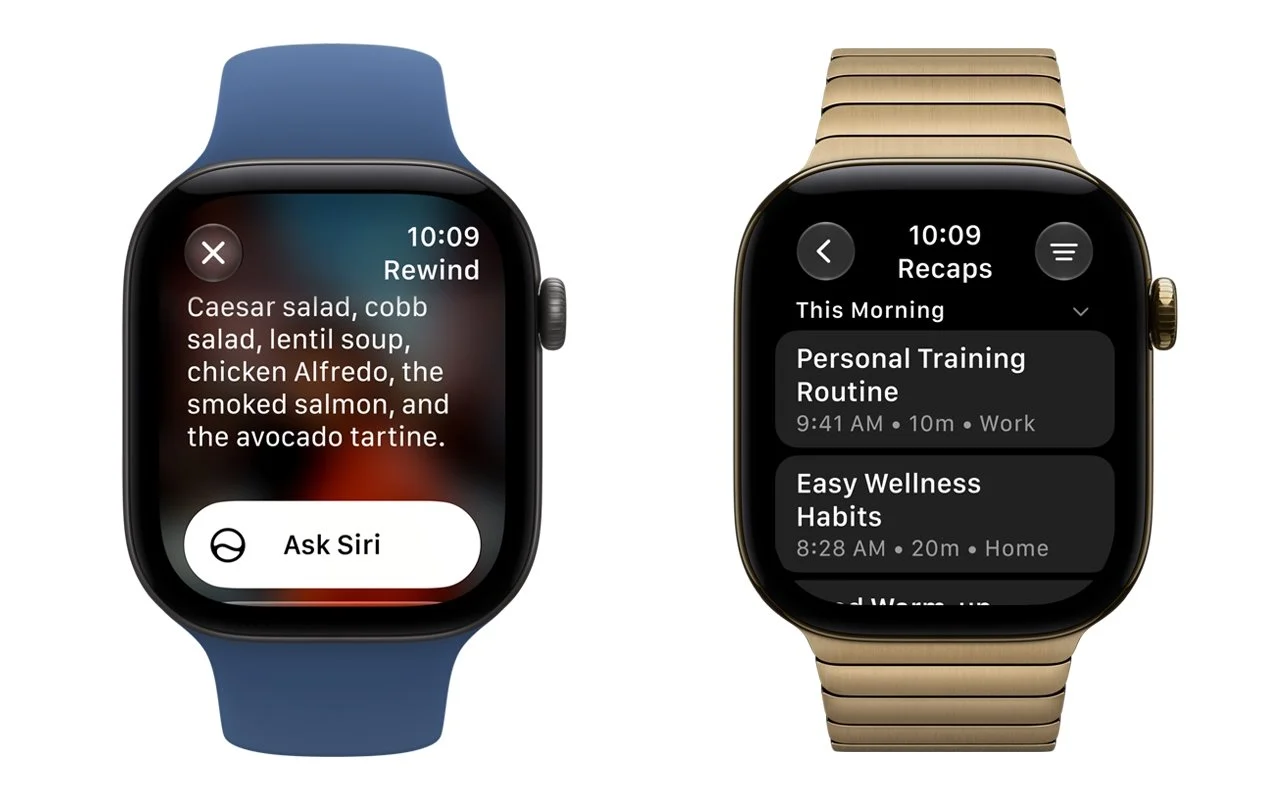
Set Workplace Rules Before Your Apple Watch Starts Taking Notes
Apple’s upcoming Live Rewind and Siri Recap features will help people remember conversations, but workplaces should prepare rules for sensitive information before the features arrive.

Check AI Skills and GitHub Projects Before You Install Them
AI skills and GitHub projects can hide risky instructions outside their descriptions. Here’s how to inspect the files, use ChatGPT or Claude as a second reader, and check the evidence before installing anything.

You Quit the App. Why Is It Still Running?
Quitting a Mac app doesn’t always stop everything it’s doing. Some apps leave background processes running to sync files, check for updates, or finish other work. In macOS 27 Golden Gate, Apple makes this activity more visible: you’ll see a notification the first time an app continues running after you quit, and hovering over its […]

Beware of Scam Party Invitations from Hijacked Accounts
The latest scam making the rounds preys on your trust and sociability. You receive what appears to be a party invite from a friend via an invitation service like Paperless Post or Punchbowl. The email legitimately comes from your friend’s account, which has been compromised, but clicking any link in it takes you to a […]

Apple Announces iPhone 18 Pro, iPhone Duo, Apple Watch Series 12 and Ultra 4, and AirPods 5
Apple’s annual September event delivered more than the usual annual iPhone and Apple Watch updates. Alongside the iPhone 18 Pro and iPhone 18 Pro Max, new Apple CEO John Ternus led the unveiling of the iPhone Duo—Apple’s first foldable iPhone—the Apple Watch Series 12 and Ultra 4 with new health-sensing and listening capabilities, and the […]

Take Quick Videos with the Camera Control
Sometimes you need to start recording video instantly—to document an incident, capture a fleeting moment, or preserve evidence. Apple has provided a shortcut that reduces the effort to just two presses of the Camera Control on the iPhone 16 and later. Press it once to open the Camera app, then press and hold again to […]
When Should You Upgrade to macOS 27 Golden Gate, iOS 27, iPadOS 27, watchOS 27, tvOS 27, and visionOS 27?
September has arrived, so Apple will soon release major upgrades for all its operating systems. iOS 27 and watchOS 27 will undoubtedly ship alongside new iPhone and Apple Watch models mid-month. iPadOS 27 will likely accompany iOS 27, as will tvOS 27 and visionOS 27. Although Apple has sometimes delayed the release of macOS until […]

Apple Updates Mac mini and Mac Studio with New M6 and M5 Ultra Chips
In a move designed to clear the decks in advance of the company’s September 9th iPhone and Apple Watch unveiling, Apple has refreshed its compact desktop Mac lineup with new chips, faster connectivity, and—unsurprisingly given the ongoing memory shortage—higher prices. The Mac mini receives the new M6 chip and M5 Pro, while the Mac Studio […]

AI-Powered Hack Shows Why Updates Are More Important Than Ever
Last month brought news of an unprecedented event in the evolution of AI. Several OpenAI models hacked a real company, not for malicious reasons, but because they decided that finding the test answers was more efficient than solving the problems themselves. This sounds like science fiction—it’s not far off the fictional Kobayashi Maru test in […]

How to Develop Safely with AI
Generative AI is transforming software development. Large language models are good at human languages, but they’re even better at programming languages, which have much smaller vocabularies and fewer ways to combine words. Most importantly, code does something, so running it confirms whether it performs as intended. The result has been a democratization of development, much […]

Be Careful When Offloading iPhone Apps
Automatic offloading of seldom-used apps can be a good strategy for recovering space on an iPhone whose storage is almost full, and iOS can do this for you in Settings > Apps > App Store > Offload Unused Apps. When you open an app that was offloaded, iOS will re-download it from the App Store […]

Eliminate Article Distractions with Safari Reader
Reading articles on the Web has become fraught with distraction. Ads are terrible, of course, but publications also inundate you with navigation links, pop-ups encouraging you to subscribe, popular article lists, and more. Even worse is when an article requires multiple clicks or taps to keep reading. It’s maddening—you just want to read and get […]

Understanding AI Today: No Longer Just a Chatbot
When ChatGPT launched in late 2022, using it was simple: you typed a prompt, and it generated text in response. That text came from a statistical model trained on data available at the time. If you asked ChatGPT about anything that had happened more recently, it either couldn’t help or would confidently make stuff up. […]


Never Miss a Meeting Again with In Your Face
If you are often late to or miss meetings because Apple’s notifications are too easy to ignore, we recommend trying the In Your Face app. Available for the Mac, Windows, iPhone, iPad, and Apple Watch, In Your Face displays unmissable full-screen alerts and plays audible alarms for calendar events and timed reminders. Unlike standard notifications […]

Try Swipe Typing with QuickPath on the iPhone
If you’ve had trouble moving from hunt-and-peck typing on the iPhone to the double-thumb typing approach many people prefer, consider QuickPath, better known as swipe typing. QuickPath isn’t new, but many people have never tried it seriously. With swipe typing, you put your finger down on the first letter of the desired word—say “giraffe”—and then […]

Control Center Is Improved—and Highly Customizable—in macOS 26 Tahoe
Control Center debuted on the iPhone over a decade ago in iOS 7 and made its way to the Mac in 2020 with macOS 11 Big Sur. However, through macOS 15 Sequoia, Mac users who wanted to tweak Control Center for their needs were limited to turning specific controls on or off. With macOS 26 […]